
Bill faster. Lose less. Keep GST ready.

Billing, stock, accounts and GST for medical stores. Runs in your browser, works offline, syncs to the cloud.

Works on any computer or laptop with Chrome or Edge. A USB barcode scanner and a printer are optional.

Never sell an expired strip again

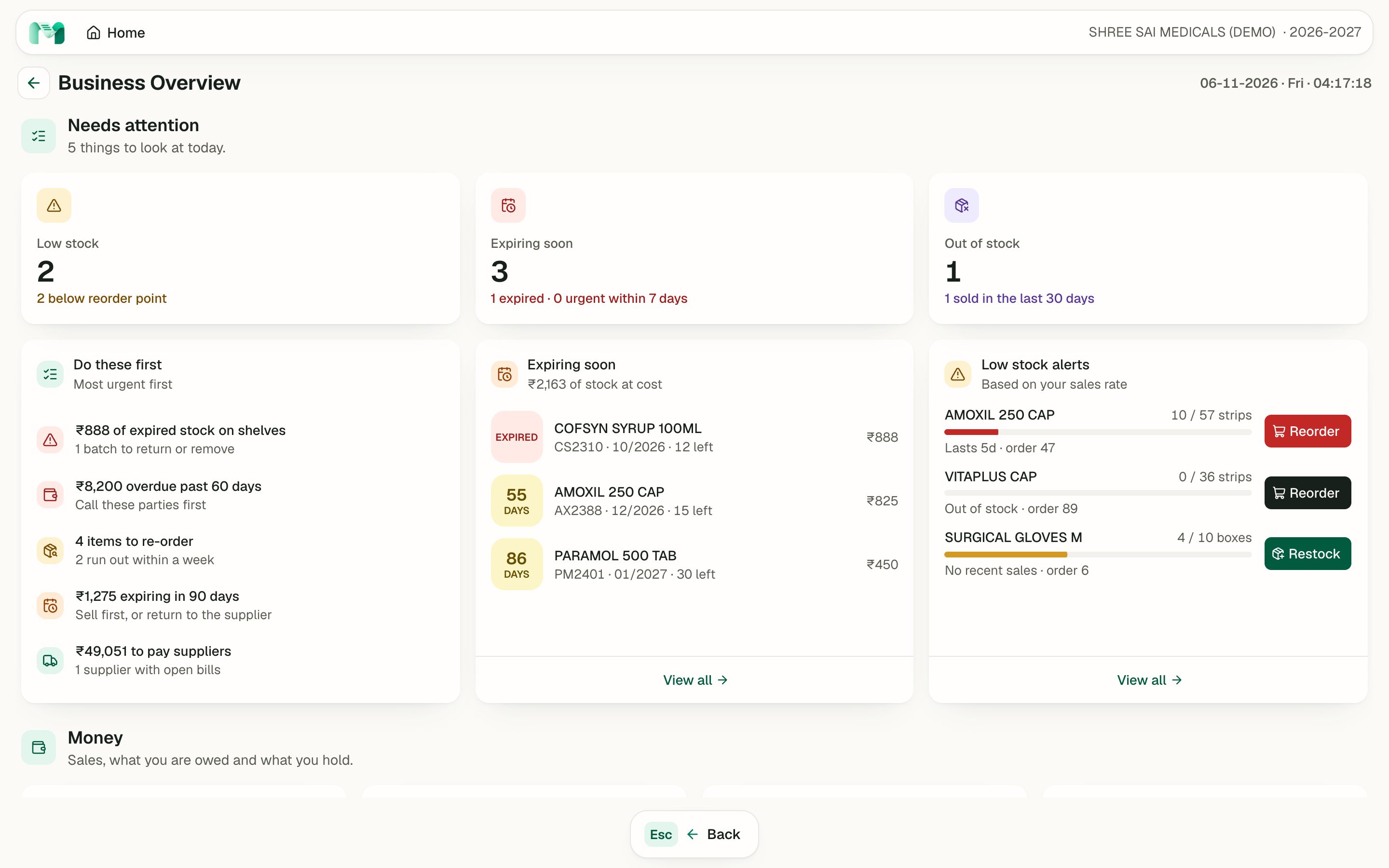
Every batch carries its expiry. When you bill, the earliest usable batch comes up first, expired stock is refused, and the owner sees what is about to go in Business Overview.

  • Earliest expiry firstThe batch list is sorted so the oldest usable stock sells first.
  • Expired stock blockedAn expired batch cannot be put on a bill, by scan or by search.
  • Near-expiry warningsNear-expiry and expired lists, and a Business Overview that puts them first.
Business Overview screen listing expired stock, expiring batches and low stock, most urgent first

Bill by the strip or by the tablet

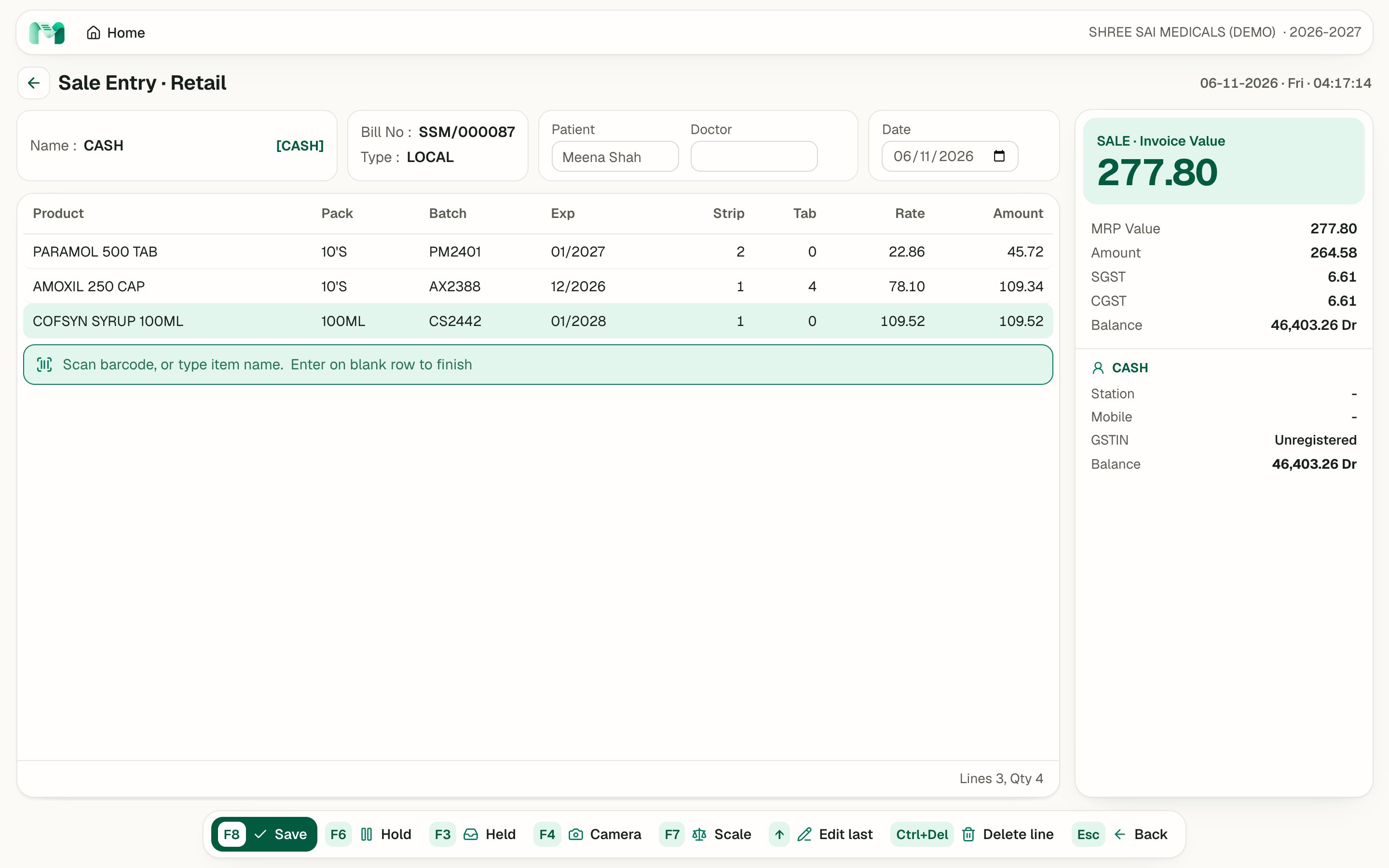
Scan the label or type a few letters. Fill strip, tablet and rate, press Enter, and the line is in. Loose tablets are priced as a share of the strip, and GST is worked out per line to the paisa.

  • Loose tablets priced rightFour tablets from a strip of ten cost four tenths of the strip rate.
  • UPI QR for the exact amountChoose UPI and a QR code for the bill total appears on screen.
  • Low-ink billsA4, A5 and 80 mm thermal layouts, with the amount in words.
Retail sale entry with three items, loose tablets on one line, and the invoice value with SGST and CGST

Month end without the GST scramble

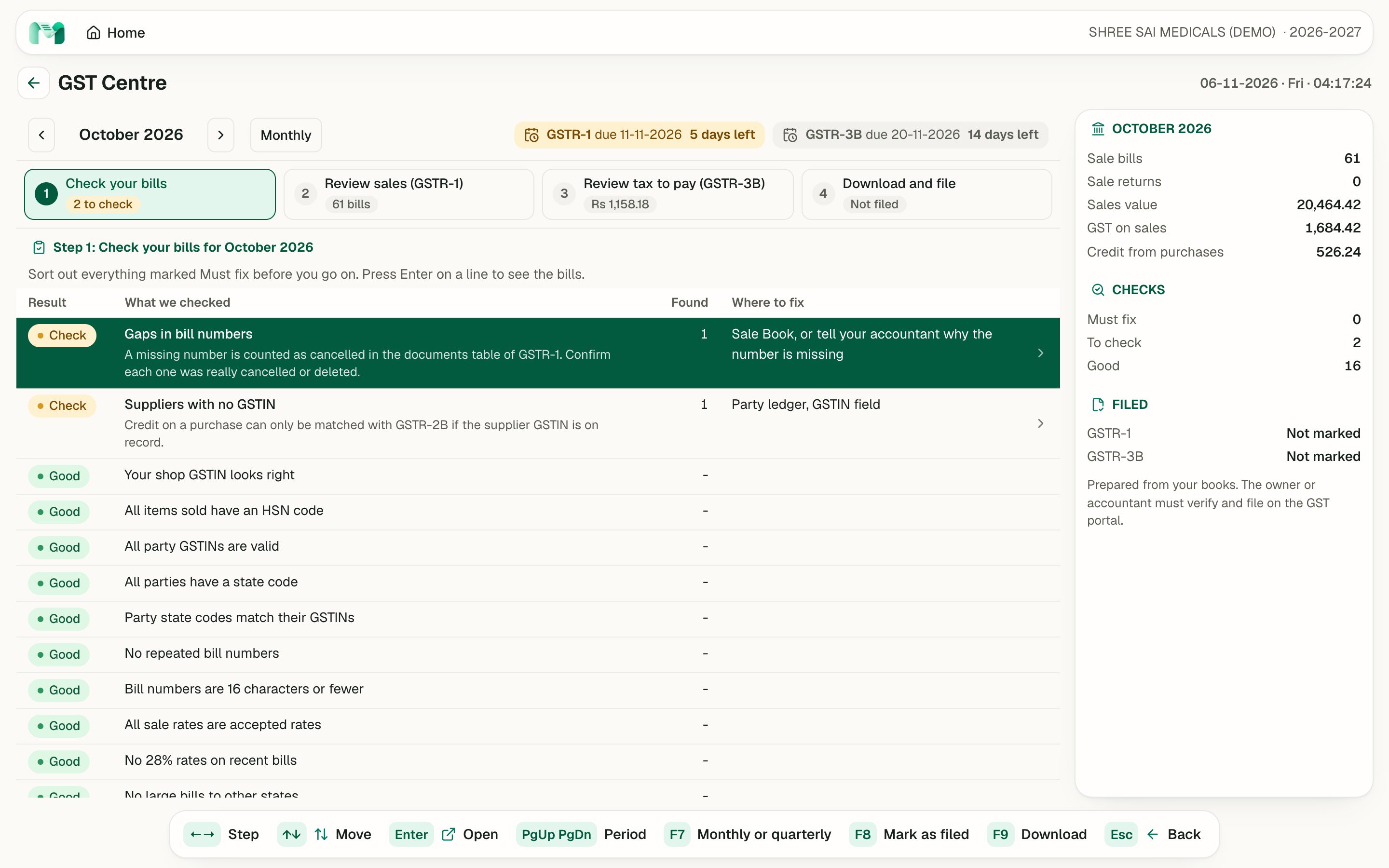
The GST Centre checks your bills in plain words, shows the due dates, and works out GSTR-1 and GSTR-3B from your books. One press downloads the pack for your accountant.

  • Plain-word bill checksGaps in bill numbers, missing GSTINs and HSN codes, each with where to fix it.
  • Due dates shownGSTR-1 and GSTR-3B dates, and the days left, on the GST Centre screen.
  • Accountant pack in one pressPress F9 for the pack. You or your accountant file on the GST portal.
GST Centre with the month, due dates and the list of bill checks

One day at the counter

Four things a medical store does every day. Scroll to walk through them.

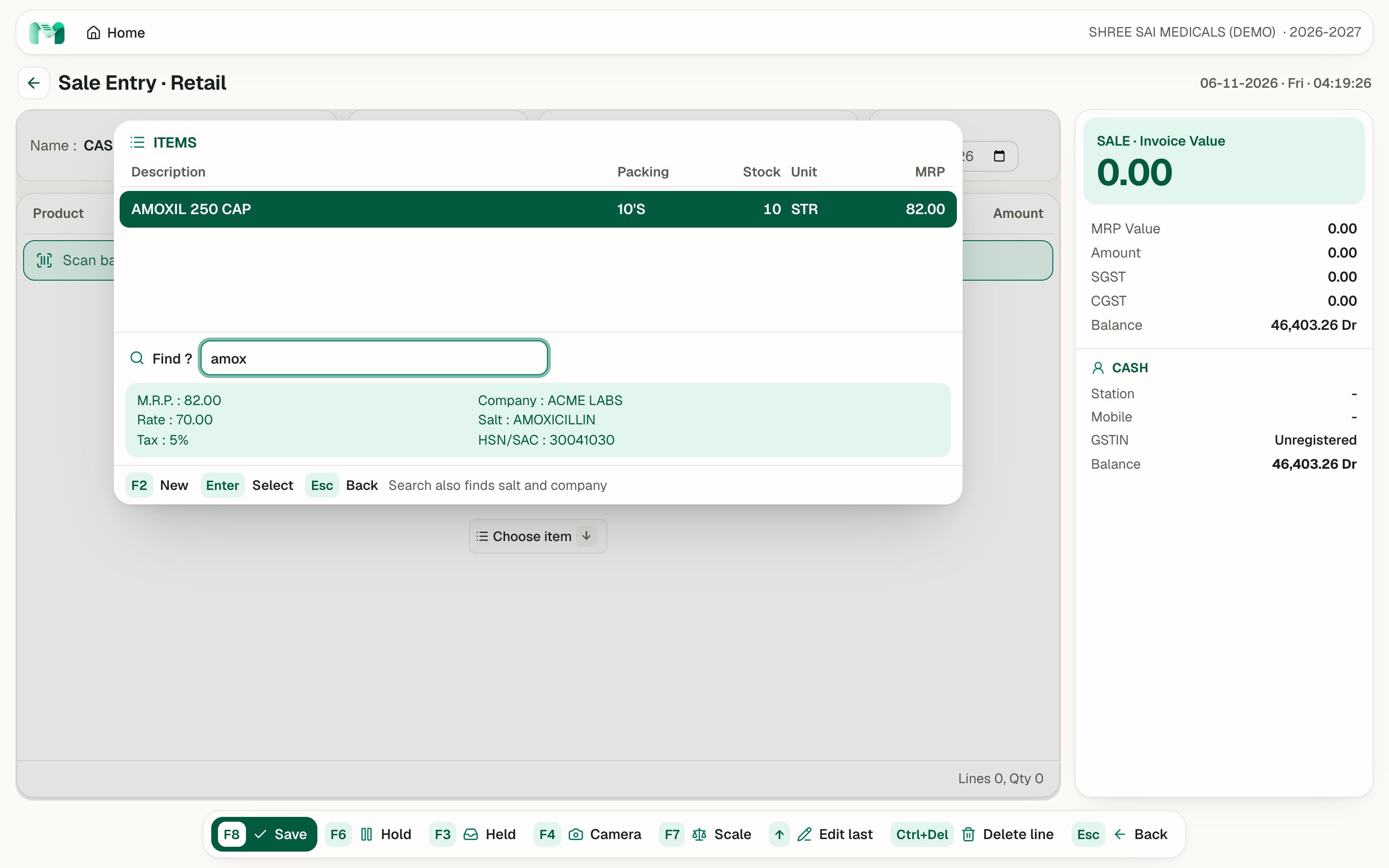
Sale entry with the item list open after typing a few letters of a medicine name
01

Scan it, or type it

  • A USB scanner works as a keyboard, so no driver is needed
  • No scanner? Press F4 and scan with the camera
  • Search also finds the salt, the company and the barcode
Retail bill with three lines and the invoice value with GST
02

Bill by strip or by tablet

  • Loose tablets are billed as a share of the strip
  • The earliest usable batch comes up first, and expired stock is blocked
  • Cash, card, or UPI with a QR code for the exact amount
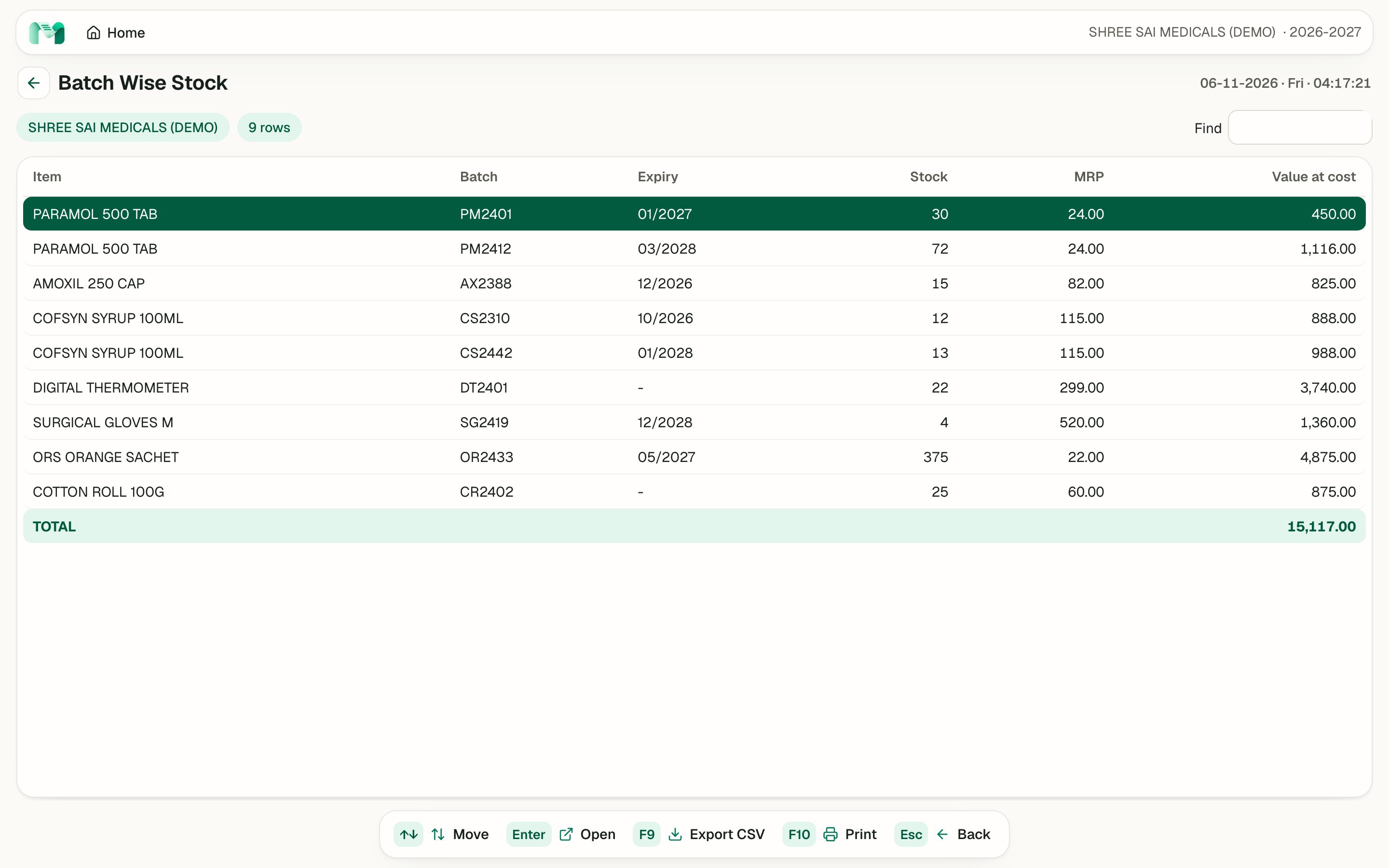
Batch wise stock report with batch, expiry, quantity and value for each item
03

Stock that corrects itself

  • Stock is recalculated from your bills, so edits and deletes fix it on their own
  • Near-expiry, expired and re-order lists are one key away
  • Business Overview shows what needs attention, most urgent first
GST Centre with the month, due dates and the list of bill checks
04

GST ready before the date

  • Checks your bills for gaps, missing GSTINs and HSN codes
  • GSTR-1 and GSTR-3B working, with due dates on screen
  • Download the accountant pack. You or your accountant file on the portal

Intro video, 88 seconds

What early users say

Early access feedback

Pehle expiry ka stock har mahine jaata tha. Ab bill karte waqt hi pata chal jaata hai, aur purana batch pehle nikalta hai.
Priya DeshmukhSai Medical, Thane
Customers ask for four tablets, not a strip. Manthan bills the loose tablets at the right price, and the strip count on the shelf stays correct.
Rahul MehtaMehta Pharmacy, Pune
My CA used to phone every month for the sales register. Now I press F9 in the GST Centre and send him the pack from the shop itself.
Anita KulkarniKulkarni Medicals, Nashik

Questions

Does it work without internet?

Yes. Every change saves in the browser first, so billing carries on without internet. When the connection returns, the books sync to the cloud about a second later. The top bar always shows Synced, Offline: will sync, or Sync failed: retrying.

Do I need to install anything?

No. Manthan runs in the browser. Open manthan.uplof.me/app, create an account and sign in. Chrome or Edge on a computer is needed only if you connect a weighing scale.

Does it file GST for me?

No. Manthan prepares: it checks your bills, works out GSTR-1 and GSTR-3B, and downloads an accountant pack and a GSTR-1 JSON draft. You or your accountant file on the GST portal. Test the JSON in the GST offline tool first, and have your accountant check the figures before filing.

Will my barcode scanner work?

If it works as a USB keyboard and sends Enter after each scan, which most scanners do by default, then yes. Bluetooth scanners that connect as a keyboard also work. Serial scanners are not supported. Scanning has so far been tested with simulated scans, so tell us your model and we will check it with you.

Is my data safe?

Your books are saved in your browser and synced to a cloud database in Mumbai. Only your signed-in account can read your data. Signing out removes the books from that browser, and you can download a backup any time from Masters. One login is one business, so staff share the login for now.

What does it cost?

Free for the first 6 months, with free setup and no setup charges. After that, call 7710894943 for pricing.

Manthan prepares GST returns; you or your accountant file.

Sign up today

Start free for 6 months

Free setup, no setup charges. Open the demo now, or call and we will set it up with you.